
Private beta
Every receipt, bill, loan and warranty — in one place.
Scan the QR code on a Serbian fiscal receipt and Parajlija reads every line item, sorts it into a category, and totals your spending by day, month, year and all time.
Line items
Not just how much — what.
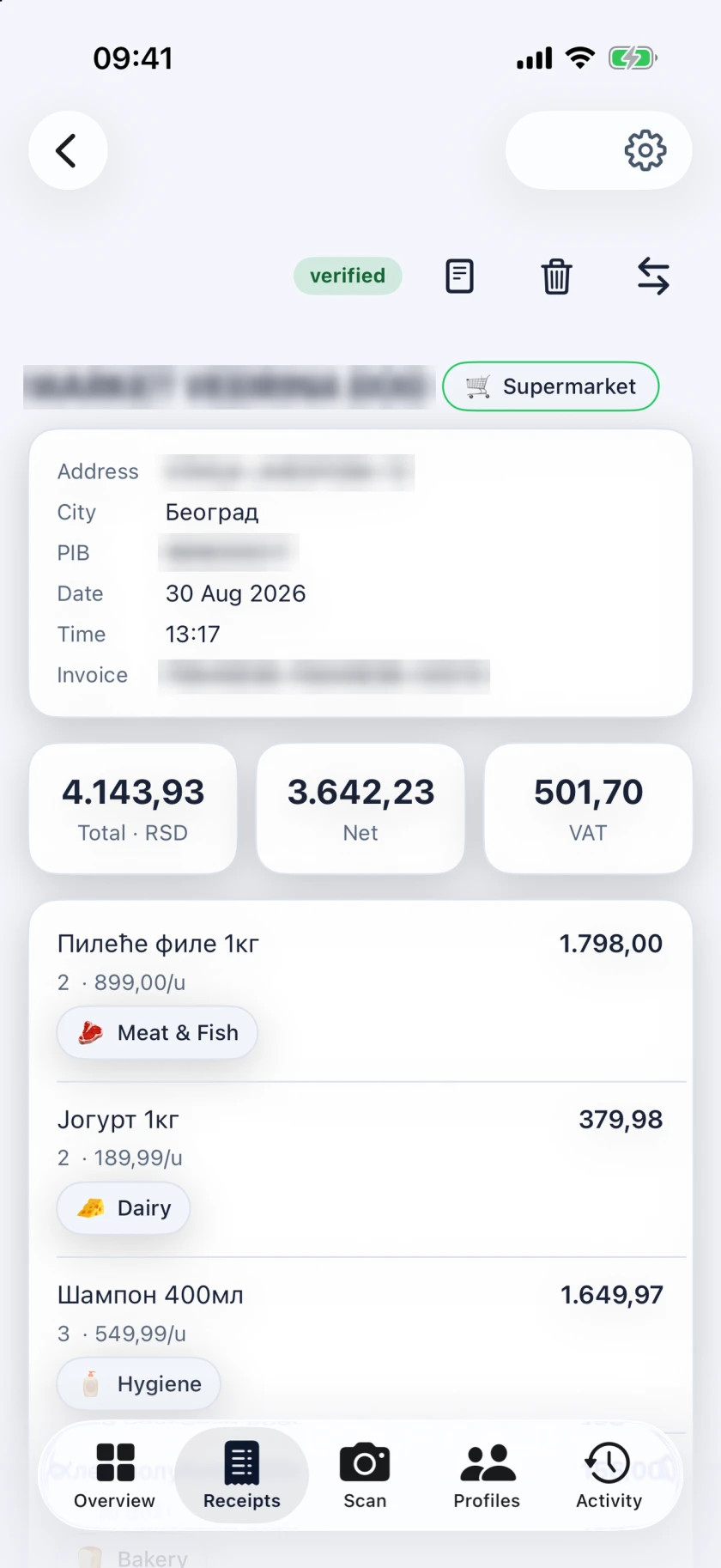
The total says how much. The lines underneath say what. Parajlija reads every one of them and gives each its own category, so a month is not one number but a list of the things you actually bought.
An example receipt
KAFE BAR TRI LASTE
Pančevo · 999000033
12.09.2026. 20:14:31
- Sok jabuka 0,2355,00
- Mineralna voda 0,75490,00
- Veliki espresso190,00
- Pivo 0,5320,00
5E1B7A3C-5E1B7A3C-50412
Verified
The shop is invented, and this is an illustration rather than a screen from the app: it shows what Parajlija reads from a receipt — the seller, every line and its amount, the total and the VAT. The numbers add up the way the app checks them.
How it works
Scan
Point the camera at the QR code, pick a photo of it, or paste its link. No QR code on the receipt? Type the tape in, and the receipt is marked as entered by hand.
Verify
A scanned receipt is fetched from the tax authority's own verification service. With no connection, the scan waits in a queue and goes through when you are back online.
Track
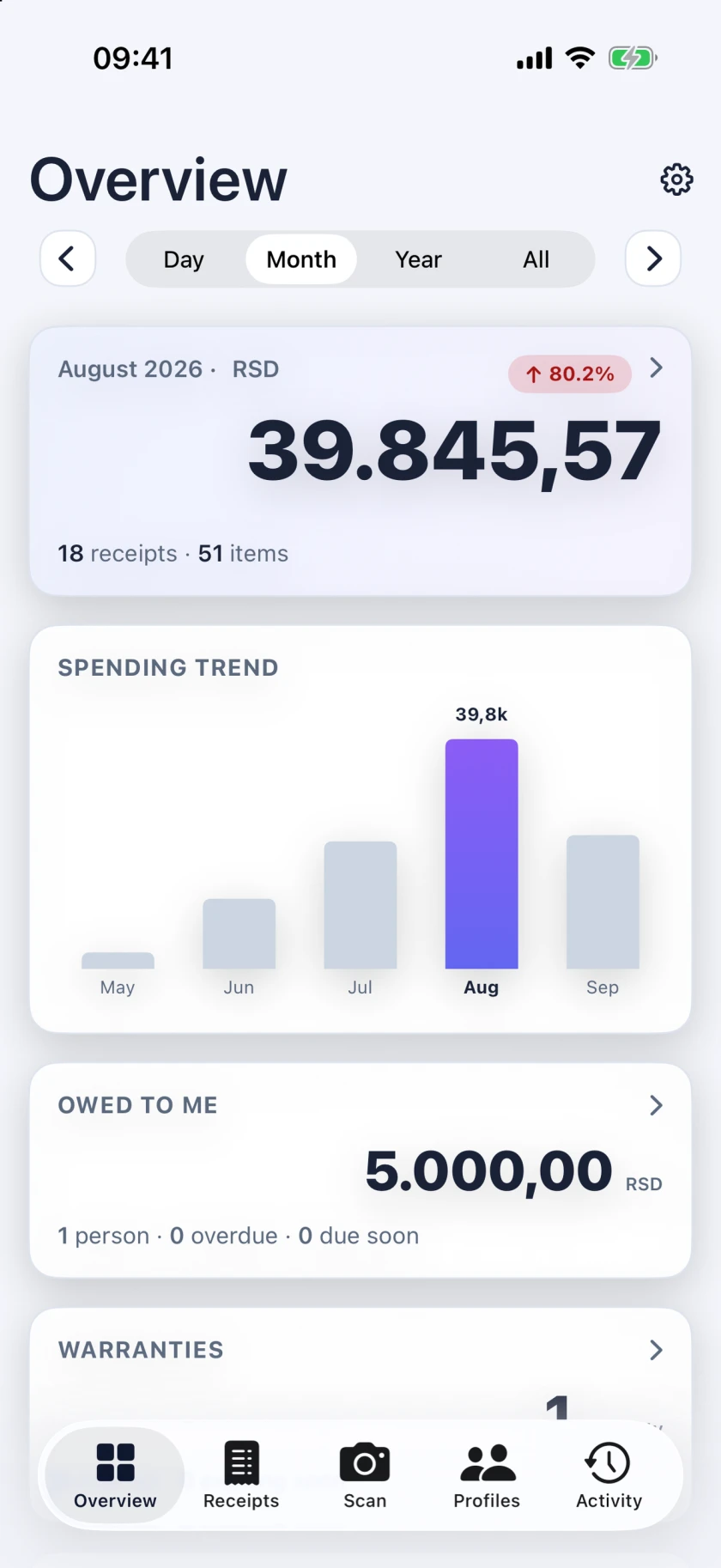
Every line lands in a category, and the totals for the day, the month, the year and all time add themselves up.
What you get
All of it is in the app today — on iPhone and Android, and with Plus on the web.
Categories and rules
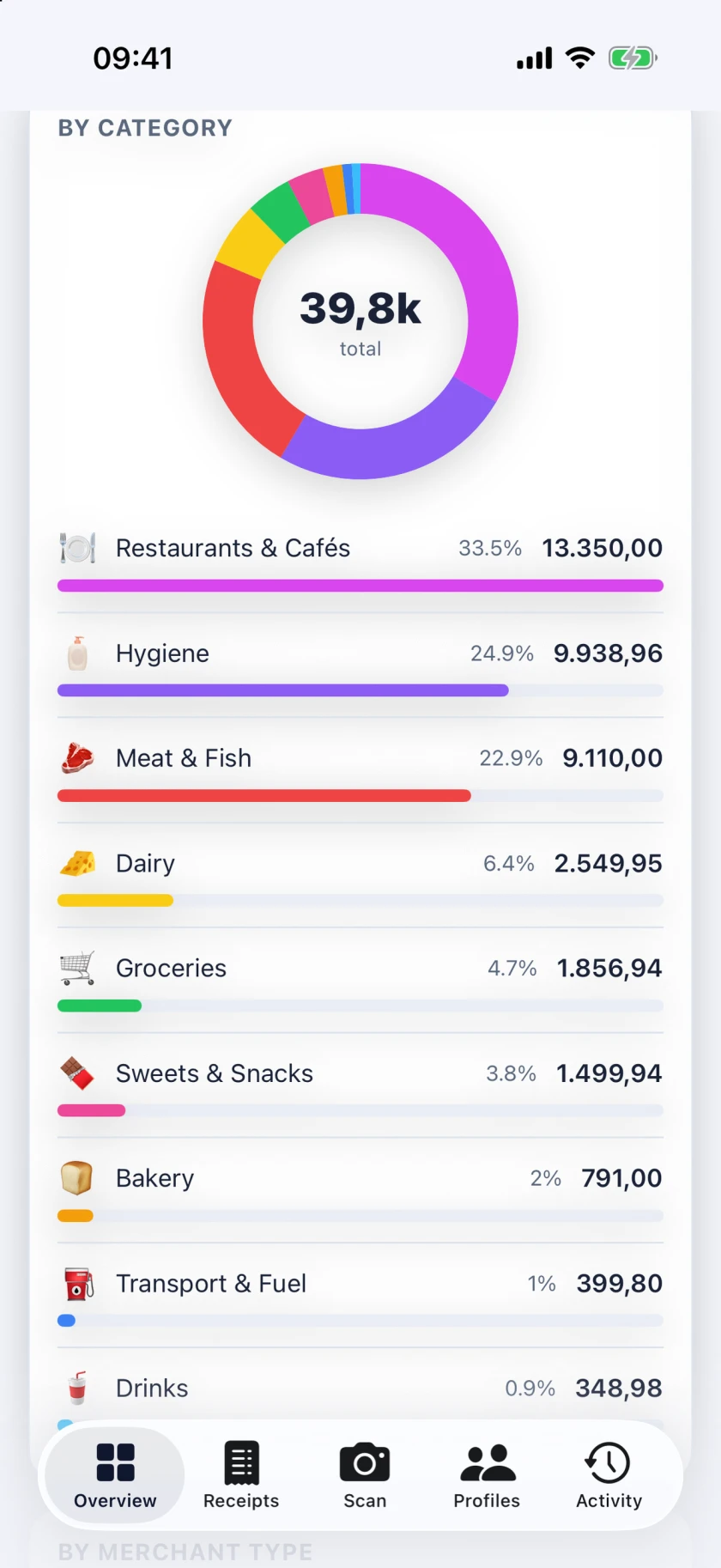
Two axes: what each line is, and what kind of shop sold it. Correct one and the profile learns a rule that beats the built-in ones on the receipts that follow.
Overview
Totals for a day, a month, a year or all time — by category, shop, shop type and payment type — with your top items and a trend you can step through.
Search that knows both scripts
ćevapЋевап
Search every receipt and every line in Cyrillic or Latin, with or without diacritics, and filter by category, shop type, payment type and more.
The original tape
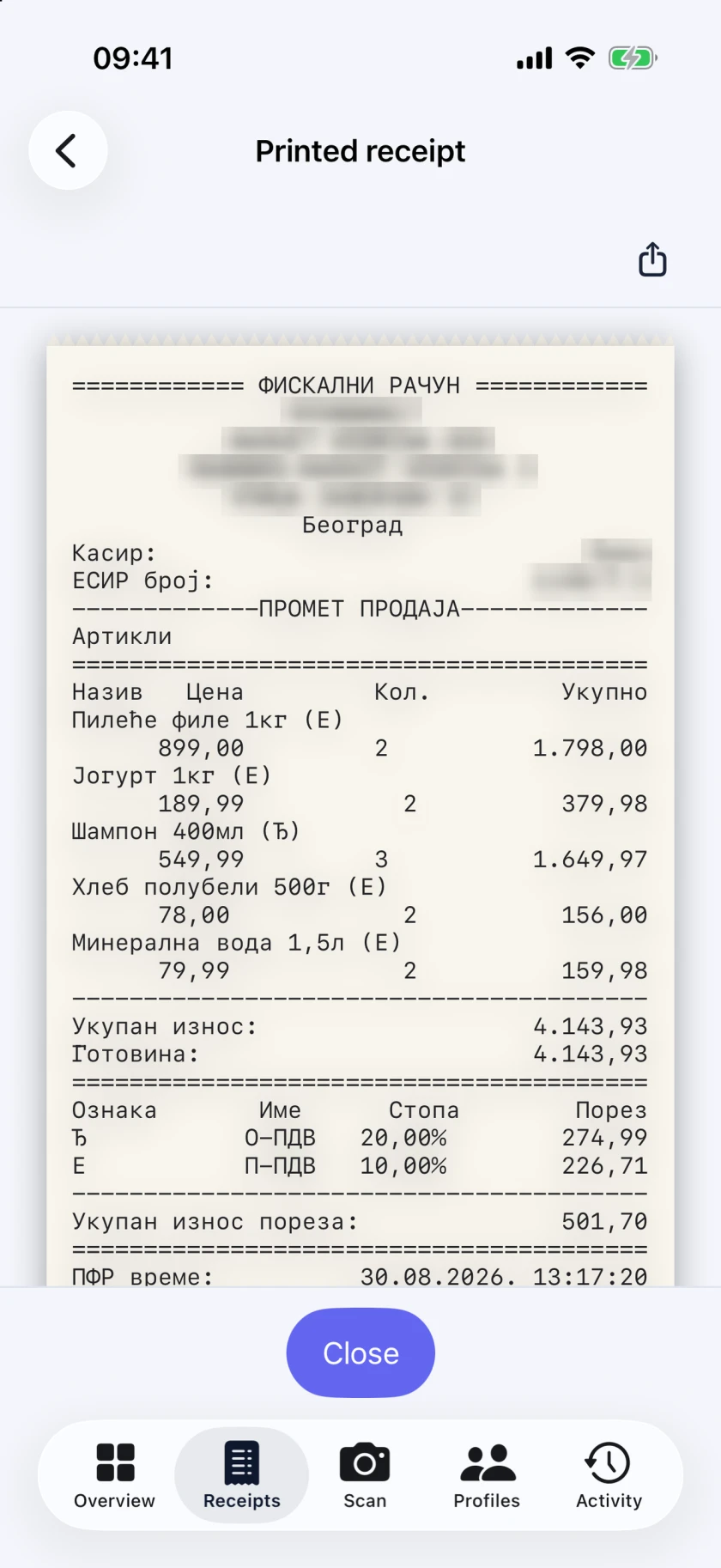
The printed receipt is kept exactly as it was issued, beside the parsed lines, so you can always compare the two.
IPS payment slips
Scan the IPS code on a bill and it is kept as an unpaid bill. It counts as spending once you mark it paid.
Refunds
Scan a refund and it is netted against the sale it belongs to, instead of being counted as spending of its own.
Expenses without a receipt
The haircut, the market stall, the rent: when there is no fiscal receipt to scan, enter the expense by hand.
Loans
Money owed to you and money you owe, in any currency, with repayments as they come in. Money you lend is not counted as spending.
Warranties
Mark a receipt as under warranty, with the date cover ends, and get a reminder before it runs out.
Tip and your part
Split the bill? Enter your part, and only your part — plus any tip — counts in your totals. The printed total stays as it was.
Profiles and sharing
Keep the household apart from your own spending. Invite people as editors or viewers, and move or copy a receipt from one profile to another.
Works offline
Your receipts are on the device. Changes and scans made without a connection are queued and sent when it comes back.
Reminders
A warranty about to run out and a loan falling due — as notifications.
Encrypted backup
Save your data to a file locked with a passphrase you choose, and keep the copy wherever you like.
Export to CSV or PDF
Download the receipts of the profiles and the period you choose, as a CSV file or a PDF. Free, on every plan.
Activity
What you did and what the app did for you — scans, edits, reminders sent — in one list, kept on your device.
Sign in your way
An email address and a password, or your Google, Apple or Microsoft account.
Light, dark, three languages
A light or dark theme, or whatever the device uses. Serbian in Cyrillic or Latin, or English.
What this is built on
The data comes from the official verification
A scanned receipt is fetched from the tax authority's own verification service, and the verdict it returns is stored with it. Nothing is guessed from a photo of the paper, and the service is asked only about the receipt — by the code in its QR — never about you.
The arithmetic is done again
The sum of the lines against the total, the VAT worked out again against the VAT reported, the payments against the amount due. If something disagrees, you are told which check failed.
Run on our own infrastructure
We run the service ourselves, with no third-party analytics. A few things do pass through someone else: to reach your phone, the text of a notification — a shop's name, an amount — travels through Apple's or Google's push service; a Plus owner's receipt photos are stored with Amazon Web Services in Frankfurt; and paying for Plus goes through Stripe.
Your receipts are not the product
No ads, no tracking scripts, nothing sold on. Not in the app, and not on this page.
Both scripts. Three clients.
Choose Cyrillic or Latin and the choice holds everywhere — in the app, in the category names, in the error messages. The Latin catalogue is generated from the Cyrillic one rather than typed twice, so the two scripts cannot drift apart.
All three use the same account. The phone apps are in private testing, open by invitation, and not yet on the App Store or Google Play. What Plus includes
Free and Plus
The phone apps are free. The web app, more profiles and synced photos come with Plus.
Free
Free
Everything on this page, in the iPhone and Android apps, with up to two profiles — your own and those shared with you, counted together. There is no limit on receipts or on history.
Plus
When Plus goes on sale: €1.99 / month or €19.99 / year
Everything in Free, plus Parajlija on your computer through the web app, more than two profiles, and up to two photos per receipt or loan, synced to every device and visible to the profile's members who also have Plus. Every new account gets Plus free for 30 days.
Ask to extend PlusPlus is not on sale yet. When your 30 days end, write to us during the beta and we extend them — support@parajlija.com
Questions
Is Parajlija an official app?
No. Parajlija is an independent product, not affiliated with the Tax Administration of the Republic of Serbia. It reads receipts from the Tax Administration's public verification service — the one the QR code on every fiscal receipt points to.
How is a receipt verified?
The QR code on a fiscal receipt links to the Tax Administration's verification service. Parajlija fetches the receipt from there and keeps the verdict it returns, then does the arithmetic again — the lines against the total, the VAT, the payments — and tells you if a check fails.
Does it work offline?
Yes. Your receipts are on the device. A scan or a change made without a connection waits in a queue and is sent when you are back online; a scanned receipt is verified then.
What do you do with my data?
We keep it in your account, on a service we run ourselves, so it is there on each of your devices. No ads, no tracking scripts, nothing sold on. The privacy page, linked at the foot of every page, says what passes through Apple, Google, Amazon Web Services or Stripe, and who can see what.
What does Plus add?
Parajlija on your computer through the web app, more than two profiles, and up to two photos per receipt or loan, synced to all your devices. Every new account gets Plus free for 30 days; Plus is not on sale yet, and during the beta we extend the 30 days on request.
What happens when my 30 days end?
The web app closes when Plus ends. Everything you added stays in the phone apps. The limit of two profiles, owned or shared, returns. The profiles you already have stay; you can't add a third. Adding synced photos stops. The photos already synced stay for 30 days and are then deleted, for everyone in your profiles. Write to us during the beta and we extend the 30 days.
How do I join the beta?
Write to support@parajlija.com, say whether you use an iPhone or an Android phone, and we will send you an invite. The apps are not on the App Store or Google Play yet.
Join the private beta
The iPhone and Android apps are in invite-only testing. Write to us, say which phone you use, and we will send you an invite.
Already have an account? Sign in to the web app — using it needs Plus.